Sunday, December 2, 2012
I've started migrating my application into the module. The major consideration has been handling the use of LINQ to SQL and the Entity Framework together.
call "C:\Program Files (x86)\Microsoft Visual Studio 11.0\Common7\Tools\VsDevCmd.bat"
sqlmetal /server:MACHINENAME /database:DBNAME /code:DataContext.cs /language:csharp /views /functions /sprocs /namespace:Models /context:DataBase
- The solution was using a new TransactionScope around the LINQ to SQL calls with TransactionScopeOption.Surpress.
During the development of a module I needed to uninstall the module from the database. There were two options, I used the later.
- I found this tutorial on developing a content part useful. It is detailed and provides another perspective. Yet another useful tutorial in creating a content part is found here. Finally, there is the very basic tutorial on creating a map content part which is perhaps the most useful for its minimalism.
- Turning a content part into a widget is straightforward through the Migration class.
The next step is for me to migrate my Controllers and Views into the module. Part of this is integrating my authentication within Orchard.
Wednesday, November 14, 2012
 For the longest time I have been logging Volume Shadow Copy (VSS) errors in my Windows Application log every few seconds. I use Crashplan to back up my machine online – other than those errors I have been very happy with it. I didn't have much luck trying to fix the error previously and have been living with it until I stumbled upon the fix.
When cleaning up space on C:\, I noticed the Crashplan cache was consuming a lot of space (9 GB on an SSD in my case). I moved the cache to the backup drive (a 3 TB USB 3 attached disk) and the errors ceased. Surprise!
If you have a log full of VSS errors try moving your Crashplan cache to another drive. You can change the location by editing the node cachepath in ProgramData\CrashPlan\conf\my.service.xml. In my case I have it on the same drive as the backup destinations (\temp\cache). Be sure to cycle the crash plan service for the change to take.
Some useful links on the error
http://www.symantec.com/business/support/index?page=content&id=TECH154496
http://www.techrepublic.com/blog/window-on-windows/how-do-i-configure-and-use-shadow-copy-in-microsoft-windows/3221
http://support.crashplan.com/doku.php/articles/vss#limitations
The VSS errors which I was receiving:
Description:
Volume Shadow Copy Service error: Error calling a routine on the Shadow Copy Provider {b5946137-7b9f-4925-af80-51abd60b20d5}. Routine returned E_INVALIDARG. Routine details GetSnapshot({00000000-0000-0000-0000-000000000000},0000000000358EB0).
Operation:
Get Shadow Copy Properties
Context:
Execution Context: Coordinator
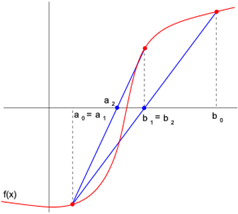 The modified false position method is fairly straightforward to implement. The method is described in most numerical methods texts in easily translatable pseudo code. The method requires evaluating the function during the solution process, requiring in a naïve implementation hard coding of the function being solved.
Function pointers can be used to pass a general function to the method, so that one implementation can be used to solve various functions. In particular, member function pointers can be used to root solve a function for one of many independent variables. Consider for example, f(x,a), where you would like to find x such that f(x,a) = 0 for a particular value of a.
One solution is to define a function g(x) = f(x,a) in a class, using a from a class member, then use the solver to solve g(x)=0. The class is used to contain the fixed independent variables so that a function pointer with one argument can be passed to the solver.
Being somewhat new to C++ myself, getting this to work took some research into member function pointers. My implementation is included below. To use it, one would, in a class, define a function which has an argument of double and returns a double using member variables to evaluate the function given a particular x. Then in the class create a member function pointer to the function being solved.
For example one could use the solver in a class "TranscendentalSolver" with a double fTranscendental(double x) member function like so:
double (TranscendentalSolver::*f)(double) = &TranscendentalSolver::fTranscendental;
// use a modified false position solver to solve the transcendental
b = ModFalsePos(f, *this, xLeft, xRight, 1E-15, 1E-15, 100, verbose);
My implementation of the modified false position method is listed below. Note: I modified it to use bisection in the case when the new root is out of bounds (an issue I had solving atan).
#ifndef __MODIFIEDFALSEPOSITION_H
#define __MODIFIEDFALSEPOSITION_H
#include
<cstdio>
#include
<math.h>
//
// Modified False Position Method, for details
// see p 129 in Numerical Methods by Chapra.
// f - function pointer to the function to find a root
// xl - lower x bound
// xu - upper x bound
// es - relative stopping error
// et - stopping error (abs(f(xr)) < et)
// imax - maximum iterations
// verbose - whether to print information to cout
//
// This is a templated Function so that a member function pointer
// may be passed. This is very useful when the function has
// several arguments, but only one is being varied. Then the
// caller may define a member function, using class members to
// find the other parameters.
template<typename F>
double ModFalsePos(double (F::*f)(double), F & obj,
double xl, double xu, double es, double et, int imax,
bool verbose)
{
// the current iteration
int iter = 0;
// lower and upper iteration counts,
// used to detect when one of the bounds
// is 'stuck'.
int il = 0;
int iu = 0;
// the current root
double xr = 0;
// the current error estimate
double ea = 0;
// the lower function value
double fl = (obj.*f)(xl);
// the upper function value
double fu = (obj.*f)(xu);
if (verbose)
{
printf("xl = %12.4e, xu = %12.4e\n", xl, xu);
printf("%6s%12s%12s%12s%12s%12s\n",
"Iter.", "x_l", "x_u", "x_r", "f(x_r)", "ea");
}
while(true)
{
// new root estimate and function value
double xrold = xr;
xr = xu - fu * (xl - xu) / (fl - fu);
// if out of bounds - false position
// has failed, use bisection
if ( xr > xu || xr < xl )
{
xr = (xl+xu)/2;
}
double fr = (obj.*f)(xr);
// iteration counter increment
iter += 1;
// error estimate (relative)
if (xr != 0 )
ea = std::abs((xr-xrold)/xr)*100;
// test signs
double test = fl*fr;
if (test < 0)
{
xu = xr;
fu = (obj.*f)(xu);
iu = 0;
il += 1;
if (il >= 2)
fl = fl / 2;
}
else
if (test > 0)
{
xl = xr;
fl = (obj.*f)(xl);
il = 0;
iu += 1;
if (iu >= 2)
fu = fu /2;
}
else
{
ea = 0;
}
if(verbose)
{
printf("%6i%12.4e%12.4e%12.4e%12.4e%12.4e\n",
iter, xl, xu, xr, fr, ea);
}
if (ea < es || std::abs(fr) < et || iter >= imax)
break;
}
return xr;
}
#endif
Sunday, November 11, 2012
 I have been moving an asp.net MVC web site of mine to the Orchard Project. As a developer I love working with MVC, however, I had not found a nice solution for content management. All of the solutions were too intrusive, tainting the MVC flavor of the site, or rather young projects I didn't want to invest in. A recent survey of Content Management System (CMS) solutions found me looking right at the Orchard Project.
The project is not 'light', but it is very elegant. The project uses the 'MS Web Stack of love' which plays very nicely with my current MVC solution. Most important, at least to me, is that it has a bunch of really smart and dedicated people behind it, allowing me to learn and adopt some really great ideas while migrating.
Actually migrating the site has been a huge learning experience for me – I'm finding much of my knowledge of open source projects to be circa 2008/2009. There are a lot of ideas to absorb in the project, but they are good ideas. Some key points that would have helped me along with the integration.
- I started with the source distribution of Orchard, unzipped it into a new location configured as a new website in IIS. From there I worked with the Visual Studio solution in the site root. I followed this guide: http://docs.orchardproject.net/Documentation/Manually-installing-Orchard-zip-file, but note the download link in the guide is old – use: http://orchard.codeplex.com/releases/view/90325 (or the newer download if 1.6 is old)
- Orchard is extensible through modules, each of which is like its own MVC project. In my case it made sense to bring my existing MVC site into an orchard module. http://stackoverflow.com/questions/5269170/integrate-existing-asp-net-mvc-application-with-orchard-cms
- Orchard uses the Razor view engine (you don't have – but I found it easier to, even though I am new to Razor). For me a big step in the migration was moving to Razor and cleaning up the Html.
- Orchard uses Themes to control the look of the site. Thus, I migrated my masterpage(s)/design into a new Theme. http://docs.orchardproject.net/Documentation/Anatomy-of-a-theme, http://www.deepcode.co.uk/2011/05/real-world-orchard-cms-part-2-creating.html
- Orchard allows for 'overloading' shapes/widgets (a 'view') through the Theme. If you want to redefine how the footer widget is rendered, for example, you would place a new Widget-Footer.cshtml in your Theme root. This definition would then override the default Orchard implementation. Similarly, to control the rendering of the Html Document, create your own Document.cshtml in the Theme. I found I was doing this a fair amount to control the output of my Theme.
- Orchard also allows for 'Alternate' variations of shapes depending on the URL, for example. I used this to define an alternate Layout-homepage.cshtml to give my home page a different definition. Note you do have to install the Designer Helper Tools module for this too work (That stumped me for a bit) http://docs.orchardproject.net/Documentation/Alternates
- When creating new 'Widgets' to serve as content regions, I found the wrapping with a div element and rendering the widget title in a header tag undesirable. I only wanted the Html Content of the widget rendered, not the extra wrapping tags. To remove the wrapping I added to the top of my widget "@{ Model.Metadata.Wrappers.Clear(); }", which prevented any Html being rendered around the widget. There's probably a better way to do this that I haven't found, though.
Currently I am migrating my MVC site into a module now that the Theme migration is complete.
Sunday, September 23, 2012
I keep my car parked outside with a car cover on it and move it about every two weeks. This seems to have made it an ideal home for ants, even though there is nothing they could eat in there. They seem to have decided it's a great home, and to just bring their food to the nest in the trunk…
I put the car cover in the trunk running errands one day, nothing out of the ordinary. When I was home and took the cover out of the trunk I noticed a whole swarm of ants migrating to the car cover… Apparently they decided the car cover was slightly better than the trunk and were moving.
I tried a few ant baits as suggested, but what really worked was gel bait that you spray. It lasts up to a year and lets you place 'lines' which the ants cannot cross. "Raid Max Bug Barrier" did the trick for me – I'm sure others make similar products.
I laid a barrier around each tire, by drawing a circle with the gel around it. The idea was to keep them from being able to go out and get more food, or at least kill them on the way. I wouldn't suggest spraying the bait on the tire itself as ehow suggests – it might damage the rubber.
I also lifted the carpet in a few locations in the car and sprayed a line of the gel. Again avoid putting the gel on something it might damage, such as the carpet. Surprisingly, the next day the ants were dead. No more roaming ants around the cabin either. Now, to keep the roaming dogs away from the cover…
Saturday, September 15, 2012
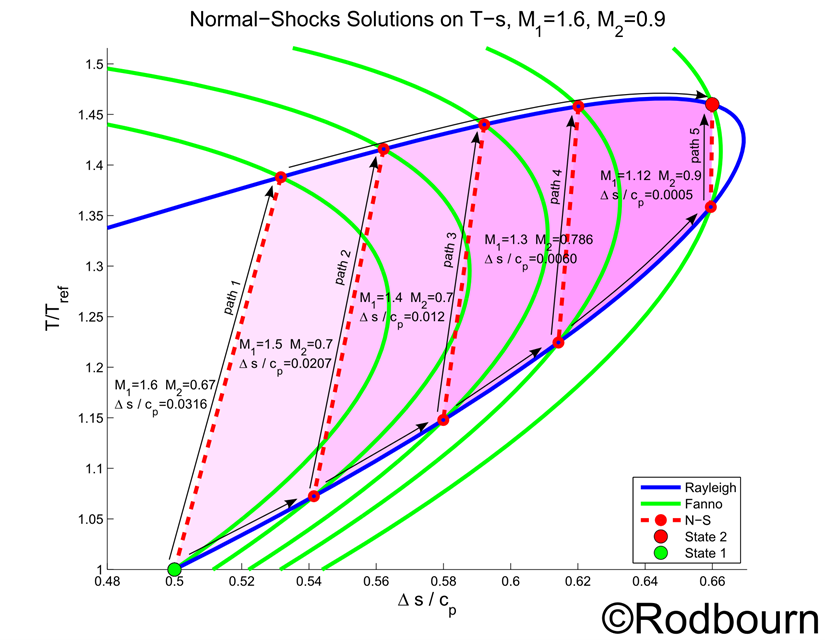
A Fanno Flow line on a T-s diagram is developed using the continuity and energy equations. A Rayleigh Flow line on a T-s diagram on the other hand is developed using the continuity and momentum equations. A solution to both a Fanno Flow and Rayleigh Flow is the same as solving continuity, momentum and energy, which are used in solving Normal Shocks.
A Normal Shock can then be seen as the intersection of both a Fanno line and Rayleigh line on a T-s diagram. In moving from state 1 to a second state 2 on a Rayleigh line there are several possible paths as shown below. While both ending states have the same Mach number, each path requires different amounts of energy (heat transfer into the flow), seen as the area under the curve on a T-s diagram. In the examples of the figure, path 5 requires the least heat and path 1 requires the most heat addition.
In creating the T-s Diagram below, all of the flows share the same reference temperature, the temperature at state 1. The entropy changes were shifted so that all the curves have zero entropy generation at state 1. The Diagram below is my own original work.
Wednesday, September 12, 2012
MediaWiki has been running painfully slow for me out of the box and the solution, as it always seems to be, was to enable caching.
I first enabled caching within MediaWiki, but this only helped… a little. I did this first step within LocalSettings.php
$wgCacheDirectory = "c:\your\path\to\cache";
$wgFileCacheDirectory = "c:\your\path\to\cache ";
$wgEnableSidebarCache = true;
$wgUseFileCache = true;
$wgShowIPinHeader = false;
$wgEnableParserCache = true;
$wgCachePages = true;
$wgMainCacheType = CACHE_ACCEL;
$wgMessageCacheType = CACHE_ACCEL;
$wgParserCacheType = CACHE_ACCEL;
$wgMemCachedServers = array();
Using Chrome's Developer Tools, particularly the network tool where each request is shown, I noticed almost all of the time was spent in loading load.php! The result was correctly being cached at the application level, with 304 Not Modified responses, but it was taking a couple of seconds to return that response. With a dozen or so resources to load (CSS/JS) this accumulates to half minute load times quickly… Something internal to MediaWiki was painfully slow. But the content returned by load.php is just static resource; just cache it at the server level.
Using the IIS GUI here will lead you into a trap – or at least it lead me into one. The GUI tends to convert "*.php" into ".php" extensions, which don't match. So, using your favorite editor add a caching entry into Web.config for the MediaWiki site. Here I chose ten minute cache timeouts.
<caching>
<profiles>
<add
extension="*.php5"
policy="CacheUntilChange"
kernelCachePolicy="CacheUntilChange"
duration="00:10:30"
varyByQueryString="*" />
<add
extension="*.php"
policy="CacheUntilChange"
kernelCachePolicy="CacheUntilChange"
duration="00:10:30"
varyByQueryString="*" />
</profiles>
</caching>
And hopefully that should do it, after the first few calls to load.php the responses should be speedily cached. Note you may want to vary by header as well if you want to simply send 304 responses with no content to save bandwidth by using browser cache. My particular application is on an intranet.
Note on browsing speed
My installation of MediaWiki is loading about ten resources. Most browsers support 6 concurrent requests (hits to load.php), see http://www.browserscope.org/?category=network. This means that the page load would have to wait for load.php twice, rather than ten times in parallel. With Firefox and IE the number of simultaneous requests can be increased, reducing the load time further, see http://gnoted.com/3-hacks-for-firefox-double-internet-browsing-speed/.
This shaves a couple seconds off of a fresh load (where the cache is empty).
Wednesday, September 5, 2012
Lately I have been setting up a local MediaWiki installation to organize and document my research (see previous posts which relate to installing MediaWiki on Windows). An essential feature is of course documentation, and nise presents a nice solution by combining two extensions, Biblio and Bibtex.
This solution allows you to use the BibTex citations from a manager such as Mendeley or JabRef in both the MediaWiki citations and LaTex citations.
I integrated the two similarly to how nise has, but with a modification on matching Bibtex entries, using a regular expression instead of a string match.
- Install Biblio and Bibtex extensions
- Open Biblio.php and location the function render_biblio
Define the following within the function (just under the two global's works)
$bibtexx = new BibTex();
Find "$text = $this->get($ref,
'text');" further down in the function and add the following just below it.
if(preg_match("/@[a-zA-Z]+/",
$text, $matches)){
$bibtexx->BibTex($text);
$text = $bibtexx->html();
}
The example by
nise will now work as intended
#localref local reference
#[[Literature]]
#somebook @book{Alexander1979,
Author = {Christopher Alexander},
Publisher = {Oxford University Press},
Title = {The Timeless Way of Building},
Year = {1979}}
#someusualbook MySelf. "Me Myself and I". Self.
#x ...
The difference with what was originally done is the Regular Expression match. Since a BibTex entry starts with @type, we test for @[someword].
Friday, August 31, 2012
This is a bit of a workaround, but it's the only way I know of to export an Excel plot into a vector format such as EPS or EMF. In my case I needed to export the plot to EPS for inclusion within a LaTeX document.
- Create the plot in Excel
- Copy the plot and paste it into a new, empty word document.
- Save the word document as a PDF. When word exports to PDF it embeds the plot in vector form.
- Using Inkscape, import the PDF
- In Inkscape, File -> Document Properties -> Resize page to content… -> Resize page to drawing or selection
- File -> Save as ->
- Select the format you want, SVG, PS, EPS, etc.
And there you have it, publication quality plots from Excel.
Keep in mind that your data values may be extracted through the vector image by someone doing a similar process with your image, i.e., opening it in Inkscape and pulling data points out. It's even worse when you send a plot in a word document; you can often recover the original Excel sheet, including your calculations (not just data!)
Tuesday, August 28, 2012
Following the guide on mediawiki.org got me 99% there with nice short URLs on Windows with IIS 7.
One small hiccup, creating subpages of the form
wiki/PageTitle/SubPageTitle
The suggested Regular Expression provided by URL Rewrite needs a simple update.
<match url="^([^/]+)/?$" />
Should be
<match url="^([^/]+.+?)/*$" />
Or, as is done in the guide, with the wiki path
<match url="^(wiki/[^/]+.+?)/*$" />
Understanding the change requires reading the original regular expression.
- "^" Match from the start of the string
- "[^/]" Here "^" has a special meaning, it negates "/" so that this matches any character but "/"
- "[^/]+" The plus means to match at least once or more
- "([^/]+)" The parenthesis are simply a grouping, so that what's matched inside is the available as the 'first match'. Put another way this selects the output from the pattern match. "{R:1}" is actually this value being used.
- "/?" Matches none to one "/" non-greedily (more on that).
- "$" Matches the end of the string
We would like it to match a title with "/" within it. MediaWiki will handle the details of splitting the title into subpages. We are already matching anything but "/", so we might as well match anything. In RegEx, a "." means just about anything (anything but a new line). We still don't want to start a title with "/", so after the first non "/" matches, lets accept anything up until the end of the string. We do that by simply inserting ".+", matching one or more of anything but a new line.
As you might have noticed, the new patterns have two other changes, an additional "?" and replacing the last "?" with "*" at the end of the pattern. Why gets into something called greedy and non-greedy matching. Consider the following path
wiki/PageTitle/SubPageTitle/
Where should the trailing "/" go? Should it be part of the title or matched as an optional end of the path, but not part of the title? The title should be "PageTitle/SubPageTitle" and not "PageTitle/SubPageTitle/", but the title matching, "([^/]+.+)" and the trailing "/" matching "/?" both may match the ending "/".
What we do is add a "?" just after the "+" to match non-greedily. When this is done, the pattern will match as short of a pattern as possible. But, we now need the trailing "/" to match greedily. We can do this easily by changing the "?" to "*" which will greedily matching zero or more trailing "/".
And there you have it, subpage support.